Workday resume parsing test: what filled, what vanished
Updated 2026-09-13 · Resmly Guides
We uploaded the same resume to Workday four times — one column and two columns, at two different employers — and compared what the parser returned. The two layouts produced identical results, field for field. But in all four uploads, the current employer's name never reached the Company field, while the two older employers parsed correctly every time.
That is one resume, two layouts, two employers. Small — and stated here rather than buried at the bottom.
What we actually did
Two PDFs. Word-for-word identical text — 279 words each, verified mechanically before upload rather than by eye. One page each. The only difference was layout:
- Variant A — single column, everything stacked top to bottom.
- Variant B — two columns, with Skills, Education, Certifications and Languages in a left sidebar and Summary and Experience on the right.
The resume content was invented — a fictional candidate, employers and university, with contact details from the ranges reserved for fiction. We uploaded through "Autofill with Resume", stopped at the review screen, captured the parsed fields, and never submitted. No recruiter received anything.
Two employers, on different Workday tenant families — one wd1 and one wd5. We are not naming them: the finding is about Workday, which they happen to buy, and it would be unfair to attach a parsing quirk to two companies for choosing a vendor. The tenant families are stated because that is what tells you the two results are independent.
One thing went wrong with the method. The uploads were made from sessions still signed in to existing candidate accounts, which contaminated the personal-details step — a stored postal code collided with the resume's city. Every result from that step is discarded and none of it appears below. The work-history and education fields below are parsed from the uploaded file, not the account, so they are unaffected. A clean run would use a signed-out private window.
Result 1: the layout changed nothing
| Field | Single column | Two column |
|---|---|---|
| Most recent employer's Company | empty | empty |
| Its job title, dates, current-role tick | all correct | all correct |
| 2nd and 3rd employers (title, company, dates) | all correct | all correct |
| Role descriptions | complete | complete |
| School or university | empty | empty |
| Degree level | Bachelors |
Bachelors |
Field of study (wd1 only) |
empty | empty |
Skills box (wd1 only) |
empty | empty |
Languages (wd5 only) |
both detected | both detected |
| Phantom entries | none | none |
Within each employer the two parses were indistinguishable — same fields populated, same fields empty, same values. Then it repeated at the second employer.
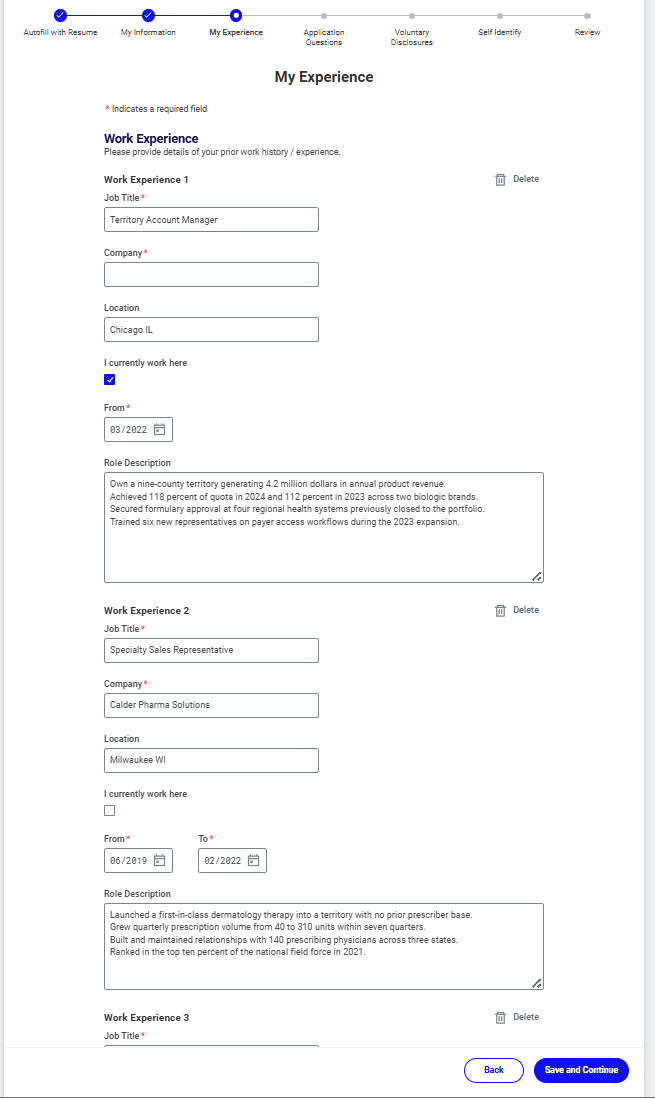
Single column. The Company box on the current role is empty; the two older employers parsed.
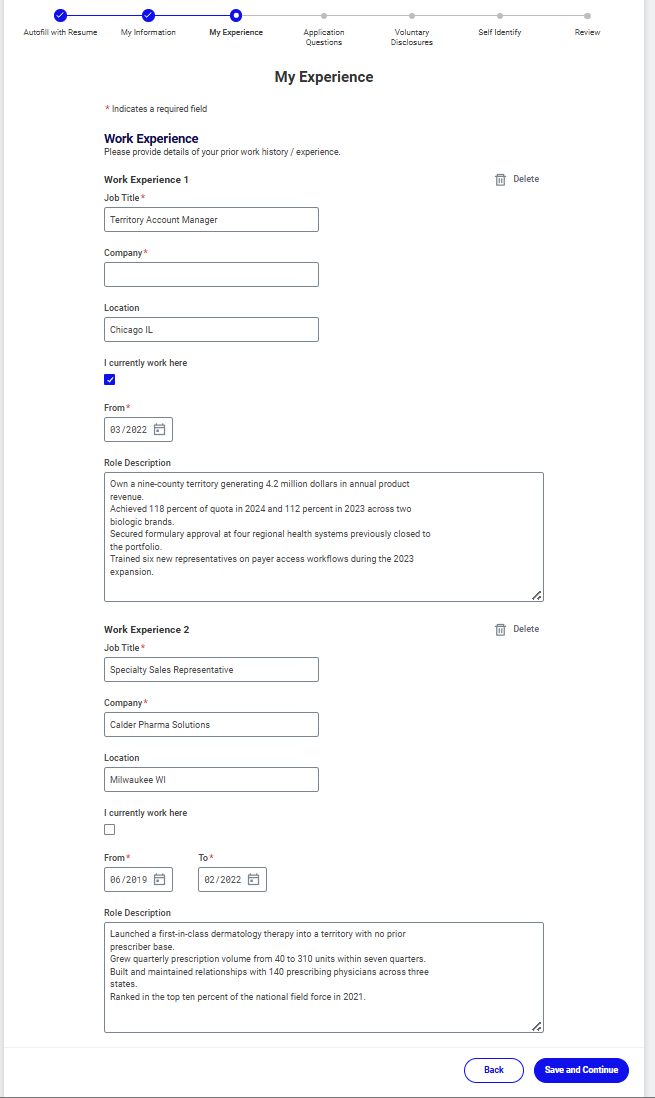
Two column, same employer and job. Identical output, same empty Company box.
The widely repeated claim that a two-column resume breaks Workday did not reproduce here.
Result 2: a free text extractor is not a model of a real parser
Before uploading anything we ran both files through an ordinary open-source PDF text extractor. Variant A came out in document order. Variant B came out interleaved — a skill name, then a fragment of the summary, then the next skill:
SKILLS
SUMMARY
Territory Management
Specialty pharmaceutical sales professional with eight years of territory ownership
Formulary Access
across biologics and rare disease. Consistent quota attainment, deep hospital
Workday produced no interleaving. Its output for variant B matched variant A exactly — every sidebar section landed in the same state as when the same words were stacked in a single column, filled where variant A filled and empty where variant A was empty. Whatever it does with page geometry, a naive reading-order failure is not visible in the result.
That gap is measurable. The October 2025 arXiv preprint Layout-Aware Parsing Meets Efficient LLMs (2510.09722) — an industrial paper from a team at Alibaba, not peer-reviewed — reports a naive language-model baseline scoring 0.548 F1 on long text fields such as job descriptions where a layout-aware pipeline scored 0.854, and finds roughly 20% of resumes use non-linear, multi-column layouts that break normal reading order.
So layout handling is real, and a commercial system can do it. Whether a given one does is an empirical question about that system — which is why we uploaded files.
Result 3: the current employer never filled, four times out of four
The two older employers landed correctly every time, from lines formatted identically in the same document. The most recent one never did.
Because it failed under both layouts, layout is not the cause. Because it failed at both employers, one employer's own setup is unlikely to be the cause — though two tenants could still share a Workday default, so that is not excluded either. Beyond that we are speculating, and we will say so: three things distinguish that entry from the two that worked.
- It sits directly beneath the
PROFESSIONAL EXPERIENCEheading. - Its date range ends in
Presentrather than a month and year. - It is the entry flagged as the current role.
We have not isolated which, or whether it is any of them. A further test changing only the date form would narrow it. We have not run that test and we are not going to guess in public.
It is worth knowing anyway. Company is marked required, and nothing on the autofill review screen draws attention to the blank — no error, no highlight, no summary of what failed to parse. We stopped before submitting, so the form's own validation may well catch it later. But at the point where you are invited to review what the parser did, the omission is easy to scroll past — on the job a recruiter reads first.
Result 4: the degree level read, the institution did not
School or University came back empty in all four uploads, while Degree mapped correctly onto Workday's controlled list — Bachelors — in all four. Field of Study was empty wherever the form offered it.
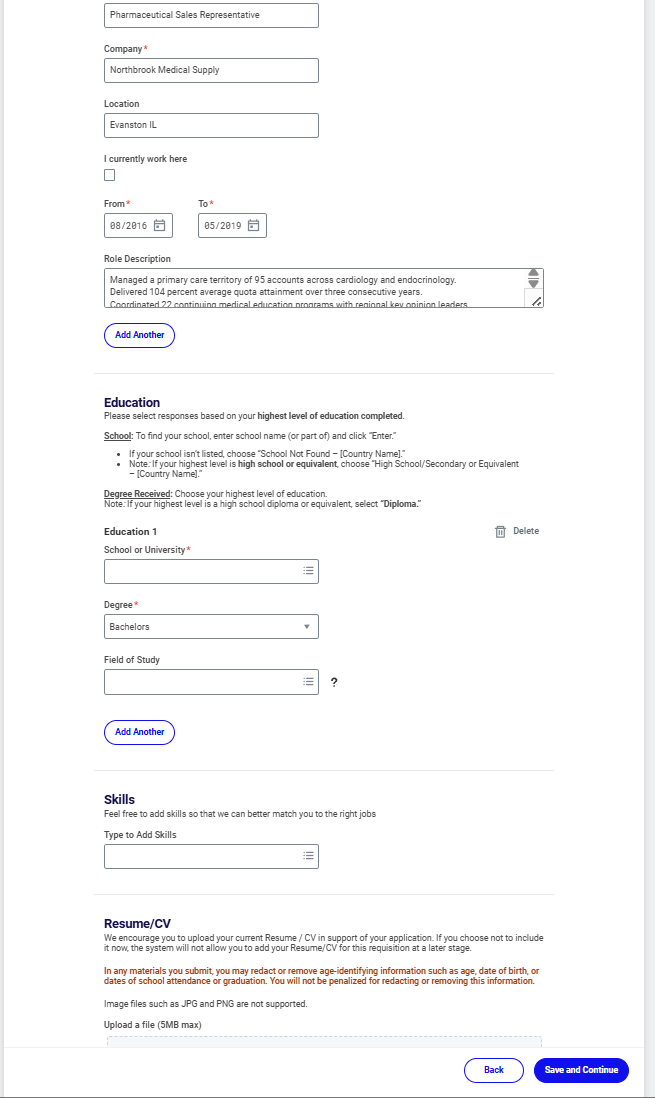
Degree level captured, institution not.
One caution on reading the table: the two employers' forms are not identical. One has a Languages section and no Skills box, the other the reverse. The same file produced two language entries where there was somewhere to put them and nothing where there wasn't — form configuration, easily misread as a parsing failure.
What to do with this
Check the Company field on your current role before you continue — every time, on every Workday application. Nothing on that screen prompts you. Check the school field too, and expect to pick your institution from the lookup by hand.
Use a single column anyway — but for the honest reason. Our two tenants handled two columns fine and we will not pretend otherwise to make the advice sound urgent. The reason is in the research: about one resume in five uses a layout that breaks reading order, parsers without layout handling lose accuracy on the long descriptive text that gets you matched, and you cannot know which parser is on the other end. A single column removes the variable at almost no cost. If you strongly prefer two, this test is a data point in your favour.
Do not judge your resume by what a text extractor shows you — that is what a naive extractor sees, not what the employer's system sees.
What we could not test
- One resume. One career shape, one industry, one length. A different document may behave differently.
- Two employers. Both Workday. This says nothing about Greenhouse, Lever, iCIMS, SuccessFactors or Taleo.
- We did not isolate the Company-field cause. Three candidates, no verdict.
- We did not submit, so we did not test the form's own validation behaviour.
- We did not test tables, text boxes, headers or footers. Those claims circulate widely and we have no evidence either way.
- We did not test scanned PDFs or DOCX. Both files were PDFs with a real text layer.
- The personal-details step was contaminated and discarded, as described above.
How this compares to the other public evidence
Enhancv has published on this question and it is worth reading — it names specific platforms and reports that of 60 successful applications reviewed, 44 (73%) used a double-column layout. They are explicit that this is a sample of people who got hired, not a controlled experiment.
The two answer different questions. Ours holds the text constant and changes only the layout, which is the only way to attribute a difference in parsed output to the layout itself. On whether two-column resumes get people hired, 60 real applications tells you more than four uploads ever could.
If you want the parser-safe version done for you
Resmly turns a job posting and your real experience into a tailored, single-column, text-layer resume and matching cover letter, built only from things you have actually done — it will not invent a title or a number. Three free, then $5 for a credit pack, one credit per resume and cover letter. No subscription, no card kept on file.
Tailoring is worth it independently of formatting: Huntr's Q1 2026 analysis reports tailored resumes converting to interviews at 4.23% against 2.07% untailored.
Frequently asked questions
Does a two-column resume break Workday?
It did not in our test. We uploaded the same resume in one column and two columns to two different Workday employers, and all four parses were identical, field for field. That is two employers and one resume — not a general law.
Why is the Company field empty after Workday autofills my resume?
We reproduced this in all four of our uploads, and only ever on the most recent role. Older employers parsed correctly from identically formatted lines. Nothing on the autofill review screen draws attention to it, so check that field yourself before you continue.
Should I still use a single-column resume?
Probably yes, but not because of Workday specifically. An October 2025 arXiv preprint found roughly 20% of resumes use multi-column layouts that break normal reading order, and that layout-aware handling lifts long-text extraction from 0.548 to 0.854 F1. You cannot tell which parser is on the other end.
Sources
Put this into practice
Resmly writes an ATS-ready resume and matching cover letter from your real experience — nothing invented, tailored to the job description you paste in. Your first three are free.
Try Resmly free